Skip to content
Learn Everyday security / English guide

Weekend security checkup

Keep others out. Keep a way back in.

Start with your email and password manager, then work outward. Check the details you set years ago, prepare a backup, and bring your trusted people into the plan.

Start while you still have access. Check your recovery options before replacing a phone or removing an old sign-in method.

PART 01

Protect your way in

Start with your primary email and password manager. They often unlock everything else.

Use a password manager, replace reused passwords, and protect the vault itself.

What to check
  • Start with email, your password manager, financial accounts, your device account, and your mobile carrier.
  • Generate long, unique passwords wherever passwords are still needed. Prioritize reused, weak, or exposed passwords.
  • Protect the password manager with its supported strong sign-in method and keep its recovery instructions somewhere you can reach without opening that vault.

Reviewed when: Your priority accounts have unique passwords, and you know how to regain access to the vault.

CISA: password managers
Use phishing-resistant sign-in and find out where each passkey lives.

What to check
  • Create a passkey from the account's own security settings on a device you control.
  • Check whether it syncs through a credential provider or stays on one device or security key.
  • Keep an independent way back in if that device or the account that syncs your passkeys becomes unavailable.

Reviewed when: You can sign in with a passkey and explain what happens if its device is lost.

FIDO Alliance: passkeys

A spare only helps after you register it with each account that needs it.

What to check
  • Consider a FIDO security key for important accounts that support it. A hardware key can hold passkeys or act as a second factor.
  • Register and test a second key where supported. Keep it securely apart from the everyday key.
  • Check the service's recovery rules before enabling a setup that requires physical keys.

Reviewed when: Your spare is registered and reachable, or you have reviewed a different supported backup method.

FIDO Alliance: security keys and passkeys

For password sign-ins, add the strongest supported authentication you can maintain.

What to check
  • Prefer phishing-resistant options such as FIDO security keys when available. Authenticator codes are another option; SMS adds protection when stronger options are unavailable.
  • Check how you would restore an authenticator after replacing your phone.
  • Never approve an unexpected sign-in prompt or give a caller a one-time code. Authenticator codes can still be phished.

Reviewed when: Password-based priority accounts have a second factor and a documented fallback.

CISA: multifactor authentication

PART 02

Keep a way back in

An old phone number or unreachable inbox can turn a lost phone into a lost account.

Open security settings on your oldest, most important accounts. Check the actual details.

What to check
  • Confirm that you still control each recovery number and can access each recovery inbox. Check old work, school, and provider addresses.
  • Add and verify a current replacement before removing an old method where possible. Follow the provider's waiting periods and confirmation steps.
  • Check recovery contacts, trusted devices, and official recovery instructions. Available options differ by service.

Reviewed when: Each priority account has current, verified recovery information and a known official recovery route.

Google: recovery options and waiting periods

Keep a secure copy outside the phone or account it is meant to recover.

What to check
  • Generate backup codes when offered and follow that service's storage instructions. A protected offline copy can avoid a device dependency.
  • Check whether codes are single-use and whether generating a new set invalidates the previous set.
  • Treat codes as secrets. Enter them only into the service's official recovery or sign-in flow, never in this checklist or a message to someone who contacts you.

Reviewed when: You know where the current codes are and can reach them without the missing device.

Google: how backup codes work

Your backup cannot depend entirely on the thing you are trying to recover.

What to check
  • Trace the path for email, the password vault, and the account that syncs your passkeys: what does each require if your phone disappears?
  • Watch for email that needs the vault while the vault needs that same email, or backup codes stored only inside the locked account.
  • Keep an independently reachable method permitted by the provider. Walk through the instructions while still signed in; do not erase devices or remove your only working method to test them.

Reviewed when: You can describe a recovery route that does not rely solely on the unavailable device or account.

Google: recovery dependencies

Give the right person appropriate access before an emergency.

What to check
  • Use supported shared vaults, delegated access, or emergency-access features for information someone else genuinely needs.
  • Have the trusted person confirm they can use their own authorized access. Keep private accounts separate.
  • Check recovery-contact and legacy-contact rules. Helping someone recover an account and accessing it after their death are different permissions.

Reviewed when: A trusted person knows the plan and has tested the access you intend them to have.

Apple: account recovery contacts

PART 03

Close the everyday gaps

Review the devices, phone number, and connected services that can reach your accounts.

Install supported updates from official settings and turn on automatic updates where practical.

What to check
  • Include computers, phones, browsers, apps, and your home router. Check whether older devices still receive security updates.
  • Remove software and browser extensions you no longer use. Keep a screen lock on devices that can open accounts.

Reviewed when: Your everyday devices are updated, with an update plan for anything still outstanding.

CISA: software updates

Review the carrier account PIN and SIM-change or number-transfer protections.

What to check
  • Use your carrier's official app or support channel to enable available account and port-out protections.
  • A SIM PIN locks use of the SIM; it is different from a carrier account PIN and does not stop a carrier-side SIM swap. Follow carrier instructions before changing it.
  • Prefer a non-SMS sign-in factor on important accounts when available.

Reviewed when: You have reviewed your carrier's protections and know which PIN protects which part of the account.

FTC: SIM-swap protection

Check signed-in devices, connected apps, forwarding rules, and security alerts.

What to check
  • Review recent activity in your email, financial, cloud, and social accounts through their official settings.
  • Revoke access you no longer need. Investigate unfamiliar email-forwarding rules and sign-ins.
  • If you find evidence of compromise, follow the provider's compromised-account process; changing a password alone may leave other access in place.

Reviewed when: You recognize the access on priority accounts and have addressed unfamiliar activity.

Google: secure a compromised account

PART 04

Prepare the people around you

Make the plan usable when a device, a connection, or a person is unavailable.

Practice verifying an unexpected request before sending money or sensitive information.

What to check
  • Agree on a separate safeword offline with your trusted group. Do not reuse an account password, PIN, or recovery code.
  • For an urgent or unusual request, pause and call back using a number you already trust. Do not rely on a familiar voice or caller ID alone.
  • If the safeword is wrong, exposed, or forgotten, stop and verify another way. Knowing a safeword does not automatically authorize a payment.

Reviewed when: Everyone knows the verification plan and has practiced a callback.

FTC: AI impersonation scams

Check that important files have a separate backup you can actually use.

What to check
  • Choose a backup that will remain available if your everyday device is lost or damaged.
  • Restore a harmless sample file to a separate location and open it. Confirm that you can reach any encryption key or account needed for recovery.
  • Review the backup after replacing a device or changing accounts.

Reviewed when: A restored sample opens successfully, and you can reach the backup without the original device.

CISA: ransomware and backups

Prepare important contacts, documents, and basic supplies for an interruption.

What to check
  • Keep emergency contacts and essential document copies in a secure place your household knows about. Keep secret recovery material protected separately.
  • Check water, shelf-stable food, needed medication, a flashlight, some cash, and a way to charge essential devices.
  • Use your local emergency-management guidance for supplies and safe backup power. Revisit the plan when your household changes.

Reviewed when: Someone else can find the offline plan and the essential supplies.

Ready Iowa: emergency supplies

THE RECOVERY CHECK

What if your usual way in disappeared?

Walk through a situation before it happens. Keep your working sessions and sign-in methods in place.

Can you access your main email without that phone, its texts, or its authenticator?

Find your independent route

  • A registered spare key or another accessible sign-in method
  • Current recovery codes kept outside the missing phone
  • A way to reach the account that syncs your passkeys

Watch for this: A screenshot of backup codes on the missing phone is not an independent backup.

Before a phone is lost, locate a supported alternative and check its instructions. If it is already missing, use the provider's official recovery and lost-device process.

Review your recovery steps

DIFFERENT TOOLS. DIFFERENT JOBS.

Know what each one protects

Passkey

A phishing-resistant credential for an account. It may sync or stay on one device.

Check your passkeys

Security key

A physical device that can hold a passkey or provide a second factor. Register the spare.

Check your backup key

Recovery method

Codes, current contacts, or another provider-approved route when normal sign-in fails.

Check your fallback

Safeword

A private phrase agreed with people you trust. It helps check a person, not unlock an account.

Make a group plan
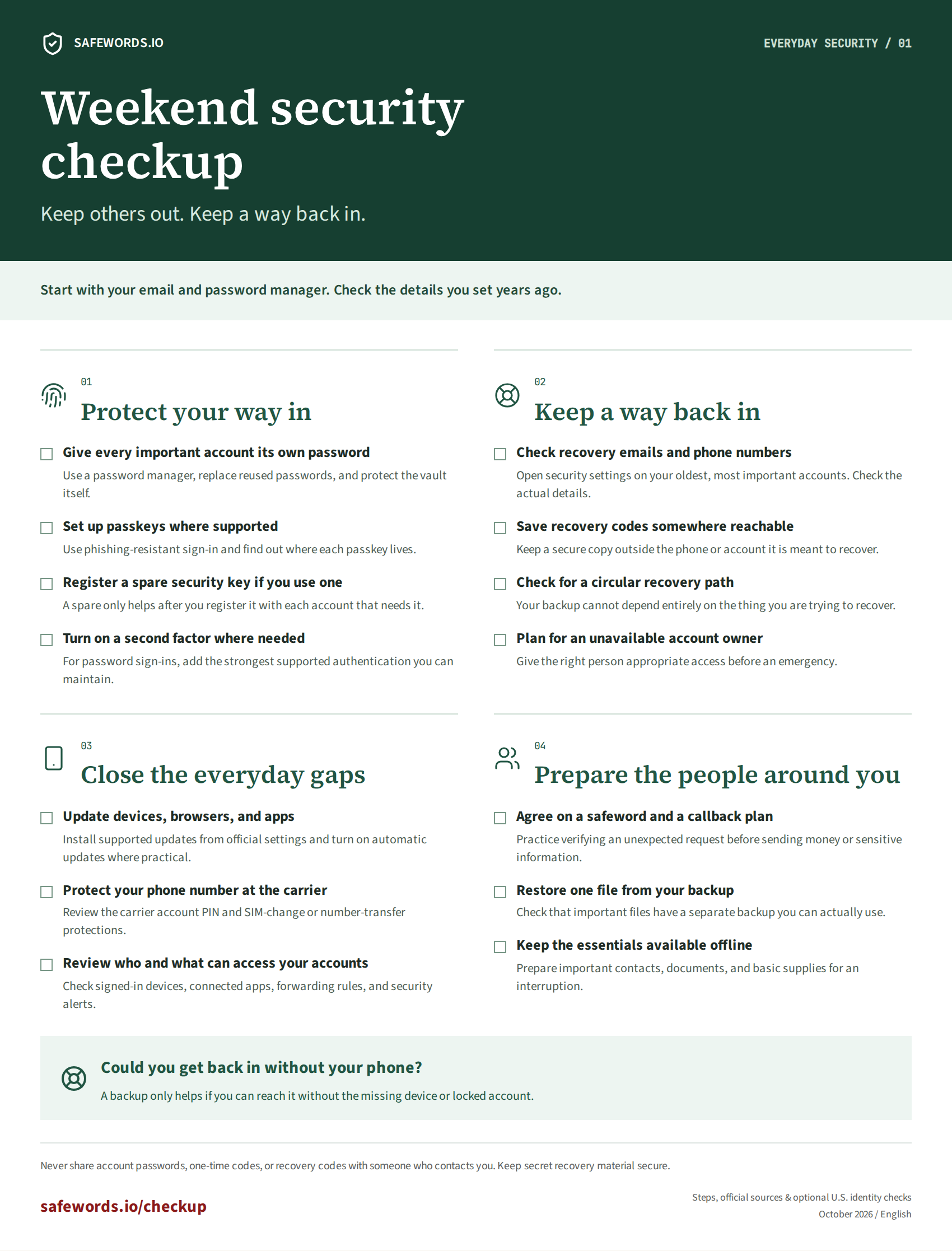
Printable Weekend Security Checkup, organized into sign-in, recovery, devices, and people.

A PLAN TO COME BACK TO

Bring the checkup to your people

Put aside time together. Check recovery details, locate a backup way in, and practice verifying an unexpected request.

The printable guide contains general actions, never your account details or recovery secrets.

Safewords.io / safewords.io/checkup

Sources checked . Account features and recovery rules vary by provider.

This guide is currently in English.